 BlackoutMode

Video Glow
Browser extensionSoft light around the video that follows the picture, like a backlight behind a TV.
Windows 10 and 11. Free, open source.
BlackoutMode sits in the tray. When the charger goes dead it cuts the power draw two or three times over, shows how long the battery and the power bank will last, and puts everything the way it was when the grid is back.
What you are doing
Flip the switch and see what changes
You do nothing. The mode turns on by itself, and the usual settings come back by themselves.
Turbo boost off, efficient cores first, lower screen refresh rate and brightness, Bluetooth off, background services and VPN on pause.
The draw is measured on battery and remembered separately for work, films and games. The time left does not jump with every spike.
Shows how much is left in it. Type the percent the bank shows, and the program learns how much it really gives.
For Ukraine it reads the Koly Ye outage schedule: warns ahead, tops the battery up and switches back when the power returns.
Game, film, build, call, quiet. A program opens, its profile turns on. On the charger a game gets full power.
Once a week it clears temporary files and caches, watches the battery wear and warns when something new adds itself to autostart.
Draw, time left, battery and power bank, today's outages and the profile. The small panel by the tray shows the same in brief.
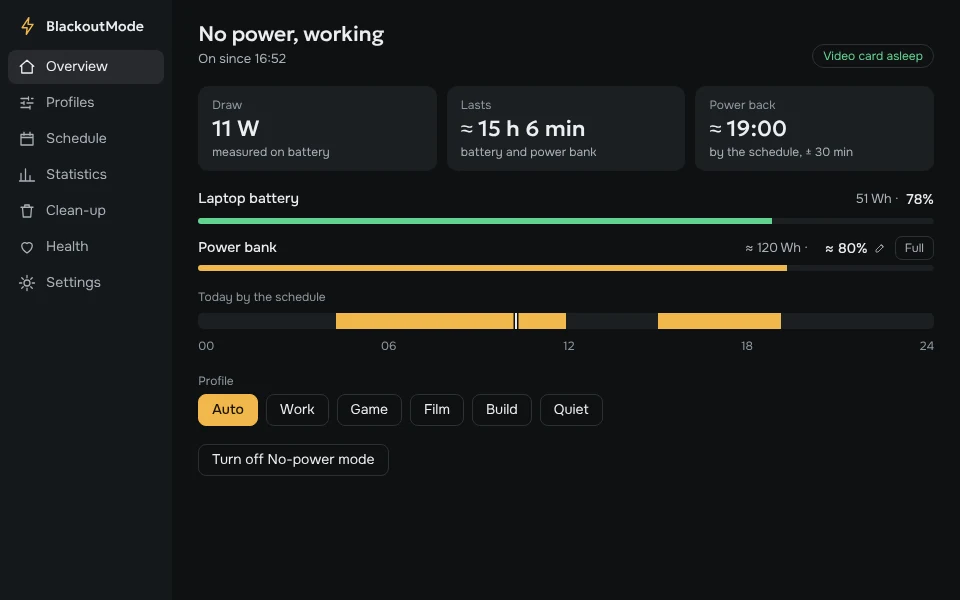
The charger is gone, the mode is on. The power is back, everything is as it was.
Every setting it touches is remembered and restored, even after a restart.
One file of 8 MB. The window is closed, nothing of it stays in memory.
No account, no statistics. Only the outage schedule and the version number are downloaded.
On first start the program checks what the laptop has and hides what is missing.
| Feature | Needs |
|---|---|
| No-power mode, profiles, schedule, power bank, clean-up | any laptop with Windows 10 or 11 |
| Cooling profile, battery charge limit | Lenovo IdeaPad or Legion |
| Putting the discrete card to sleep | built-in graphics plus NVIDIA |
| Lower refresh rate | a screen that offers one |
No. Before changing a setting the program remembers its value and puts it back when the mode turns off. If the laptop was switched off in the middle, everything is restored on the next start.
It depends on the laptop. On mine the draw falls from 30–60 W to 12–17 W. The Statistics page has a button that measures it on yours: three minutes without saving, three with it.
Yes. Everything except the power bank counter works from the laptop's own battery.
Yes. Only the outage schedule is tied to Ukraine; the mode itself turns on whenever the charger is unplugged, anywhere.
The file is not signed with a paid certificate, so SmartScreen may ask on the first run. The code is open, and every release is built from it by GitHub.
VKARDIN / TOOLS
All made by one person. Free and open source.
Soft light around the video that follows the picture, like a backlight behind a TV.

Evens out the volume in films: you can hear the dialogue and the explosions don’t blast.

A screenshot with one key, then arrows and captions right on top of it.

Video in a small window on top of everything else. Remembers where you stopped.

Power outage schedules for every region of Ukraine, with a countdown until the power is back.

Shake the phone to turn on the flashlight. Flip it over for silence.

Your home server at hand: apps, monitoring and notifications.
github.com/vkardin · Free and open source